
Serverless Intelligence: How to deploy an AI Agent using Docker, ECR, and AWS Lambda

AI agents are having a moment. Everyone is building them, and for good reason. But getting an agent running on your local machine is only half the story. The real challenge is deploying it reliably in the cloud.
In this article, I walk through how I built a simple financial data agent using the Finnhub API, covering IPO information and market news, and how I deployed it on AWS from scratch.

First, let's setup the project structure. My project structure looks like this.
simple-agent/
├── .dockerignore # Docker ignore patterns
├── .env # Environment variables (for local testing)
├── .git/ # Git repository metadata
├── .github/
│ └── workflows/
│ └── deploy.yml # GitHub Actions CI/CD pipeline
├── .gitignore # Git ignore patterns
├── README.md # Project documentation
├── dockerfile # Docker container configuration
├── pyproject.toml # Python project configuration
├── src/ # Main application source
│ ├── agent/
│ │ ├── __init__.py # Package initializer (empty)
│ │ └── agent.py # Main AI agent implementation
│ ├── handler/
│ │ └── lambda_handler.py # AWS Lambda entry point
│ ├── memory/
│ │ └── __init__.py # Package initializer (empty)
│ └── tools/
│ ├── __init__.py # Package initializer (empty)
│ └── finhub_tools.py # Financial data API tools
└── uv.lock # UV package manager lock file
The first step is building the agent itself. The goal is simple - take a natural language request, understand the user's intent, pull the right financial data using the available tools, and return a useful response. (For now, memory is out of scope, but adding memory capabilities is on the roadmap.)
Let's get into it.
import sys
import os
sys.path.append(os.path.dirname(os.path.dirname(os.path.abspath(__file__))))

from pydantic_ai import Agent
from dotenv import load_dotenv
from tools.finhub_tools import ipo_calendar_tool, market_news_tool
import asyncio
from datetime import datetime
import pydantic_ai
pydantic_ai.debug = True
load_dotenv()


# Create the agent directly instead of using inheritance
fin_agent = Agent(
    model="openai:gpt-5.1",
    system_prompt=f"You are a financial analysis expert. Provide insights based on financial data. Use the tools available to you. Today's date is {datetime.now().date()}.",
    tools=[ipo_calendar_tool, market_news_tool]
)
I have used Pydantic AI framework to build this agent, because why not?! Actually though, my research showed that Pydantic AI was the most highly recommended. It's easy to learn and also easy to use in production. I have also used OpenAI’s GPT 5.1 model as the LLM for this Agent. As you can see I have introduced two tools for this agent. Let’s see how these tools are wired.
import os
import finnhub
from dotenv import load_dotenv
load_dotenv()

finnhub_client = finnhub.Client(api_key= os.getenv("FINNHUB_API_KEY"))

def ipo_calendar_tool(_from: str, to: str) -> str:
    """
    Fetches the IPO calendar for a given date.
    Args:
        date (str): The date for which to fetch the IPO calendar in YYYY-MM-DD format.
    Returns:
        str: A summary of IPOs scheduled for the given date.
    """
    # Implementation to fetch IPO calendar from FinHub API
    # Example response (to be replaced with actual API call)
    return finnhub_client.ipo_calendar(_from=_from, to=to)


def market_news_tool(category: str, min_id: int) -> str:
    """
    Fetches the latest market news for a given category.
    Args:
        category (str): The category of news to fetch (e.g., 'general', 'forex', 'crypto').
        min_id (int): The minimum news ID to fetch news from.
    Returns:
        str: A summary of the latest market news in the specified category.
    """
    # Implementation to fetch market news from FinHub API
    # Example response (to be replaced with actual API call)
    news = finnhub_client.general_news(category, min_id)
    news_summaries = [f"{item['headline']}: {item['summary']}" for item in news]
    return "\n".join(news_summaries)
These tools are built using Finnhub's own SDK. As you can see, the agent can access IPO calendar details and market news, and since Finnhub offers a wide range of APIs, adding more tools down the line is straightforward. And yes, an MCP integration is already on the roadmap, that's coming in a future post.
With the agent ready, the next step is wiring up an entry point. Since the plan is to run this on AWS Lambda, we'll write a Lambda handler to invoke the agent.
## a lambda handler to invoke the agent
import sys
import os
import json
import asyncio
sys.path.append(os.path.dirname(os.path.dirname(os.path.abspath(__file__))))
from agent.agent import fin_agent

async def run_agent(user_input: str) -> str:
    response = await fin_agent.run(user_input)
    return response.output

def lambda_handler(event, context):
    """
    AWS Lambda handler function
    """
    try:
        # Extract input from the event
        if isinstance(event, dict):
            user_input = event.get('input', event.get('body', ''))
            if isinstance(user_input, str) and user_input.startswith('{'):
                # Parse JSON string
                try:
                    parsed_input = json.loads(user_input)
                    user_input = parsed_input.get('input', user_input)
                except json.JSONDecodeError:
                    pass
        else:
            user_input = str(event)

        if not user_input:
            return {
                'statusCode': 400,
                'body': json.dumps({'error': 'No input provided'})
            }

        # Run the agent asynchronously
        response = asyncio.run(run_agent(user_input))

        return {
            'statusCode': 200,
            'body': json.dumps({
                'response': response,
                'input': user_input
            })
        }

    except Exception as e:
        return {
            'statusCode': 500,
            'body': json.dumps({
                'error': str(e),
                'type': type(e).__name__
            })
        }
When the Lambda function is invoked, it extracts the user message from the event body and asynchronously passes it to the agent, which uses an LLM to process and respond. The prompt and context engineering are intentionally minimal here because the priority was getting the deployment working first, with room to iterate and improve from there
Okay! Now let’s move into the next phase; THE DEPLOYMENT.
For deployment, I'm using a containerised AWS Lambda function. The case for serverless here is straightforward: no server provisioning, no scaling headaches, no patching. AWS handles the infrastructure automatically, scales on demand, and you only pay for actual execution time. For an AI agent that's event-driven and invoked on demand rather than running continuously, it's a natural fit.
Also I need the lambda function to be updated whenever I make any changes to my agent’s code, like prompt changes/adding new tools, etc. But If I do this manually, I have to containerize this app manually and add to AWS ECR manually (AWS’s container repository), where the containers are stored, AND update the lambda to use that container. It's a lot of work. So I’m gonna build a CI/CD pipeline to do that automatically for me.
For that I need to write a GitHub workflow as follows,
name: Deploy Simple Agent (Lambda Container)

on:
  push:
    branches:
      - main
  workflow_dispatch:

env:
  AWS_REGION: ap-southeast-1
  LAMBDA_FUNCTION_NAME: simple-agent-lambda-image
  ECR_REPOSITORY: simple-agent-lambda

jobs:
  deploy:
    runs-on: ubuntu-latest
    permissions:
      id-token: write
      contents: read

    steps:
      - name: Checkout repository
        uses: actions/checkout@v4

      - name: Configure AWS credentials (OIDC)
        uses: aws-actions/configure-aws-credentials@v4
        with:
          role-to-assume: ${{ secrets.AWS_ROLE_ARN }}
          aws-region: ${{ env.AWS_REGION }}
          audience: sts.amazonaws.com
          role-session-name: GitHubActions-${{ github.run_id }}
          role-duration-seconds: 3600

      - name: Login to ECR
        uses: aws-actions/amazon-ecr-login@v2

      - name: Ensure ECR repository exists
        run: |
          aws ecr describe-repositories --repository-names "${{ env.ECR_REPOSITORY }}" >/dev/null 2>&1 || \
          aws ecr create-repository --repository-name "${{ env.ECR_REPOSITORY }}" >/dev/null

      - name: Build and push Docker image
        run: |
          set -euo pipefail

          AWS_ACCOUNT_ID=$(aws sts get-caller-identity --query Account --output text)
          IMAGE_TAG="${{ github.sha }}"
          ECR_URI="${AWS_ACCOUNT_ID}.dkr.ecr.${{ env.AWS_REGION }}.amazonaws.com/${{ env.ECR_REPOSITORY }}"

          echo "AWS_ACCOUNT_ID=$AWS_ACCOUNT_ID"
          echo "ECR_URI=$ECR_URI"
          echo "IMAGE_TAG=$IMAGE_TAG"

          docker build -t "${ECR_URI}:${IMAGE_TAG}" .
          docker push "${ECR_URI}:${IMAGE_TAG}"

          echo "ECR_IMAGE_URI=${ECR_URI}:${IMAGE_TAG}" >> $GITHUB_ENV

      # ✅ Change 1: Update IMAGE first
      - name: Update Lambda image
        run: |
          echo "Updating Lambda image..."
          aws lambda update-function-code \
            --function-name "${{ env.LAMBDA_FUNCTION_NAME }}" \
            --image-uri "${{ env.ECR_IMAGE_URI }}"

      # ✅ Change 2: Wait for image update to finish BEFORE config update
      - name: Wait for image update to complete
        run: |
          aws lambda wait function-updated \
            --function-name "${{ env.LAMBDA_FUNCTION_NAME }}" \
            --region "${{ env.AWS_REGION }}"

      # ✅ Change 3: Update config after wait
      - name: Update Lambda configuration
        run: |
          echo "Updating Lambda configuration..."
          aws lambda update-function-configuration \
            --function-name "${{ env.LAMBDA_FUNCTION_NAME }}" \
            --timeout 60 \
            --memory-size 512 \
            --environment Variables="{FINNHUB_API_KEY=${{ secrets.FINNHUB_API_KEY }},OPENAI_API_KEY=${{ secrets.OPENAI_API_KEY }},LOG_LEVEL=${{ vars.LOG_LEVEL || 'INFO' }}}"

      # Optional: wait again after config update (makes tests more reliable)
      - name: Wait for configuration update to complete
        run: |
          aws lambda wait function-updated \
            --function-name "${{ env.LAMBDA_FUNCTION_NAME }}" \
            --region "${{ env.AWS_REGION }}"
What does this do?
- Any push to ‘main’ branch triggers the pipeline (Mostly merging feature branches to ‘main’)
- GitHub securely authenticates to AWS using OIDC
- The AI agent is containerized with Docker
- The image is pushed to AWS ECR
- AWS Lambda is updated to use the new image
- Environment variables and secrets are injected from GitHub Secrets
Following is the complete architecture diagram for the agent system.
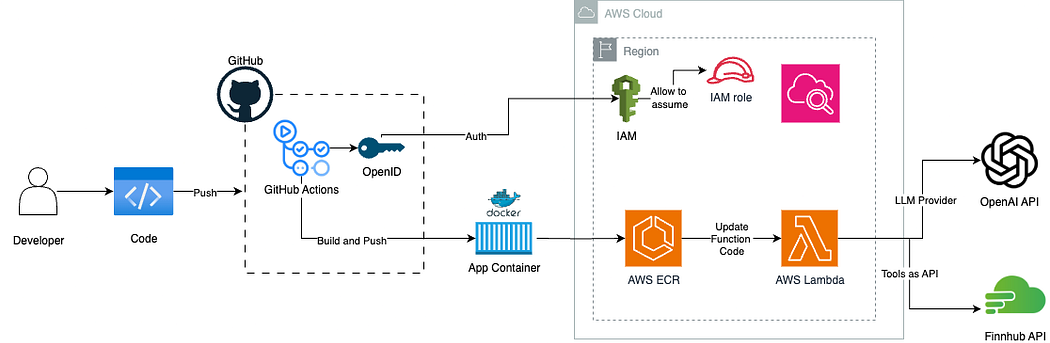
There are a few supporting setup steps not covered in detail here, such as configuring OIDC on AWS and setting up the right IAM policies, but these are well-documented and straightforward to work through. To trigger the pipeline, you can push directly to the main branch, though the better practice is to work off a feature branch and merge into main, just as you would in a production workflow. Getting the CI/CD pipeline configured correctly did take a few iterations, but once it clicked, everything ran smoothly.
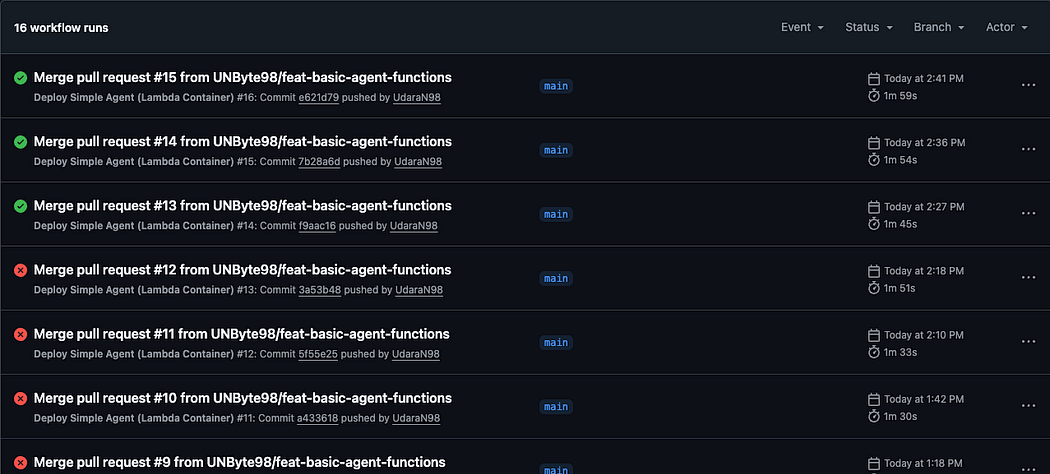
As you can see I have failed many times before doing it right!
And now, the moment of truth, let’s test the agent by triggering the lambda.
You can either do that by using postman by creating a lambda URL with AWS credential attached HTTP request, but I’m doing it using lambda’s own console.
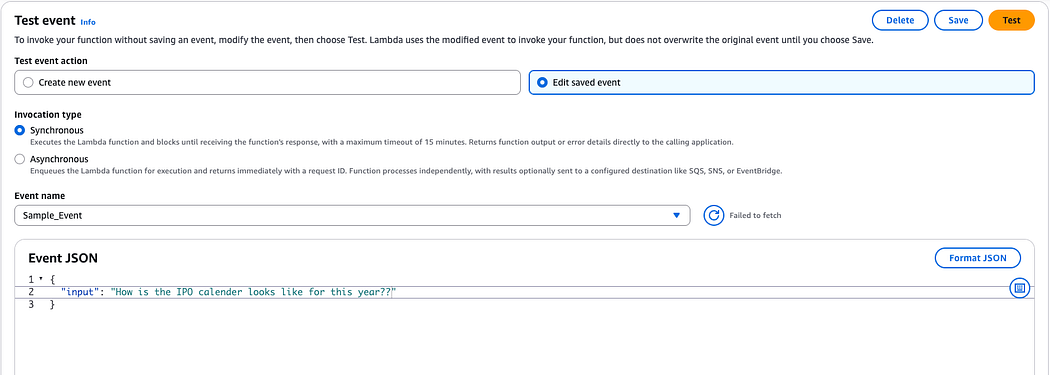
AAAND hit test!
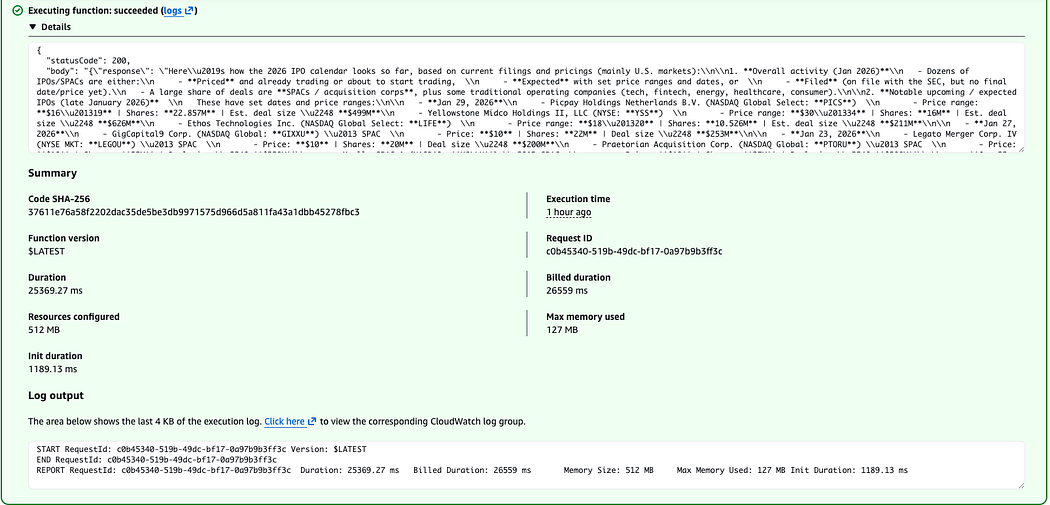
Success!! Let’s see how our agent did.
Here’s how the 2026 IPO calendar looks so far (based on current filings and pricings, mainly U.S. markets):\n\n1) Overall activity (Jan 2026)\n- Dozens of IPOs/SPACs are either priced, expected (with ranges/dates), or filed (no final date yet).\n- A large share are SPACs, plus some traditional operating companies (tech, fintech, energy, healthcare, consumer).\n\n2) Notable upcoming / expected IPOs (late Jan 2026)\n- Jan 29, 2026:\n • Picpay Holdings Netherlands B.V. (NASDAQ: PICS) — Range: $16–19 | 22.857M shares | ~$499M\n • Yellowstone Midco Holdings II, LLC (NYSE: YSS) — Range: $30–34 | 16M shares | ~$626M\n • Ethos Technologies Inc. (NASDAQ: LIFE) — Range: $18–20 | 10.526M shares | ~$211M\n\n- Jan 27, 2026:\n • GigCapital9 Corp. (NASDAQ: GIXXU) — SPAC — $10 | 22M shares | ~$253M\n\n- Jan 23, 2026:\n • Legato Merger Corp. IV (NYSE MKT: LEGOU) — SPAC — $10 | 20M shares | $200M\n • Praetorian Acquisition Corp. (NASDAQ: PTORU) — SPAC — $10 | 22M shares | $220M\n • Xsolla SPAC 1 (NASDAQ: XSLLU) — SPAC — $10 | 25M shares | ~$288M\n\n- Jan 22, 2026:\n • RIKU DINING GROUP Ltd (NASDAQ: RIKU) — Range: $4–6 | 2.25M shares | ~$15.5M\n • AIGO HOLDING Ltd (NASDAQ: AIGO) — Range: $4–6 | 2M shares | ~$13.8M\n\n3) Recently priced IPOs (already completed or imminent listing)\n- BitGo Holdings, Inc. (NYSE: BTGO) — Priced Jan 22 | 11.82M @ $18 | ~$213M\n- Aldabra 4 Liquidity Opportunity Vehicle, Inc. (NASDAQ: ALOVU) — SPAC — Jan 22 | 26.1M @ $10 | $261M\n- X3 Acquisition Corp. Ltd. (NASDAQ: XCBEU) — SPAC — Jan 21 | 20M @ $10 | $200M\n- Infinite Eagle Acquisition Corp. (NASDAQ: IEAGU) — SPAC — Jan 16 | 30M @ $10 | $300M\n- FG Imperii Acquisition Corp. (NASDAQ: FGIIU) — SPAC — Jan 16 | 20M @ $10 | $200M\n- OneIM Acquisition Corp. (NASDAQ: OIMAU) — SPAC — Jan 14 | 25M @ $10 | $250M\n- Green Circle Decarbonize Technology Ltd (NYSE MKT: GCDT) — Jan 13 | 2.5M @ $4 | $10M\n- Aktis Oncology, Inc. (NASDAQ: AKTS) — Biotech — Jan 9 | 17.65M @ $18 | ~$318M\n- Lafayette Digital Acquisition Corp. I (NASDAQ: ZKPU) — SPAC — Jan 9 | 25M @ $10 | $250M\n- Bleichroeder Acquisition Corp. II (NASDAQ: BBCQU) — SPAC — Jan 8 | 25M @ $10 | $250M\n- BUDA JUICE, INC. (NYSE MKT: BUDA) — Jan 8 | ~2.67M @ $7.50 | ~$20M\n- Soren Acquisition Corp. (NASDAQ: SORNU) — SPAC — Jan 7 | 22M @ $10 | $220M\n- Art Technology Acquisition Corp. (NASDAQ: ARTCU) — SPAC — Jan 6 | 22M @ $10 | $220M\n- Black Spade Acquisition III Co (NYSE: BIIIU) — SPAC — Jan 6 | 15M @ $10 | $150M\n\n4) Filed but not yet scheduled (pipeline examples)\n- Starlink AI Acquisition Corp (OTAIU) — SPAC — ~$69M\n- Spring Valley Acquisition Corp. IV (SVIVU) — SPAC — ~$230M\n- Clear Street Group Inc. (CSIG) — Financial services — ~$100M\n- SOLV Energy, Inc. (MWH) — Renewables — ~$100M\n- SpyGlass Pharma, Inc. (SGP) — Healthcare — ~$100M\n- Eikon Therapeutics, Inc. (EIKN) — Biotech — ~$100M\n- Liftoff Mobile, Inc. (LFTO) — Adtech — ~$100M\n\n5) Withdrawn so far (examples)\n- Unitrend Entertainment Group Ltd\n- DT House Ltd\n- SIBO HOLDING Ltd, EvoNexus Group LTD, Altech Digital Co., Ltd.\n\n6) What this suggests so far\n- SPACs are still very active.\n- Mix includes tech/fintech, biotech, renewables/energy, consumer, and financial infrastructure.\n- Deal sizes range from ~$10–20M up to ~$200–600M.\n\nIf you tell me the sector and region you care about, I can narrow this to a watchlist and key filing risks.
Cool isn’t it??
I should add here that this article doesn't mention what happens if the Lambda times out during a long LLM call, which is a real concern. (That's because I didn't think about it, I will next time)
Next thing is to do attach this AWS lambda function to something like AWS API Gateway to expose this AI agent as an API so it can be integrated with a proper frontend. That’s a good start for my next blog I think :]
If you are interested, the whole repo is public and the repo can be accessed here.